


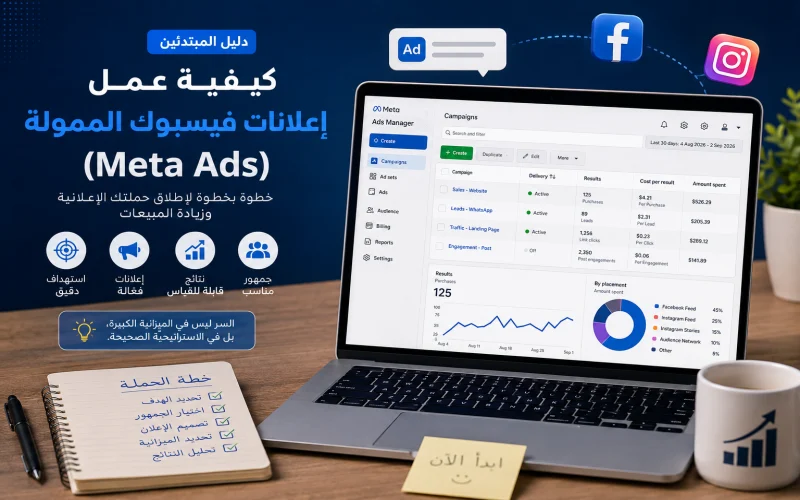
Are you wondering how to run Facebook ads (Meta Ads) in a way that gets the most out of your budget, instead of spending it on campaigns whose results you cannot measure? Whether you run an online store, offer services, or are launching a startup, success on Facebook and Instagram does not come from picking an attractive image, writing some ad copy, and pressing “Boost”.
A successful ad starts with understanding your business goal and defining the result you want. Then you set up the campaign in Meta Ads Manager, choose the right audience, set placements and budget, and prepare the right creative. After launch comes an equally important stage: analyzing data, monitoring performance, and making the adjustments needed to reach the best possible results.
In this guide, you will learn step by step how to run Facebook ads as a beginner, from choosing the campaign objective and defining your audience, through setting the budget and creating the ad, to measuring results and improving performance. We will also cover the most common mistakes that hurt results and drain your budget without the return you need.
What Are Meta Ads and How Do They Work?
Meta Ads are paid campaigns that put your business content in front of the right audience based on the campaign’s objective and settings. They are a core part of Facebook marketing for reaching customers and achieving business goals. Meta ads are not limited to Facebook. They can also appear on Instagram, Messenger, Reels, and other placements across the Meta ecosystem. Campaigns are managed in Meta Ads Manager, where you set:
- The campaign objective.
- Where the result should happen.
- The audience.
- The budget.
- The schedule.
- The placements.
- The image or video.
- The text and headline.
- The call-to-action button.
- How conversions are measured.
The Structure of a Meta Ads Campaign
One of the most important things a beginner needs to understand is that a Meta Ads campaign has three main layers:
Campaign
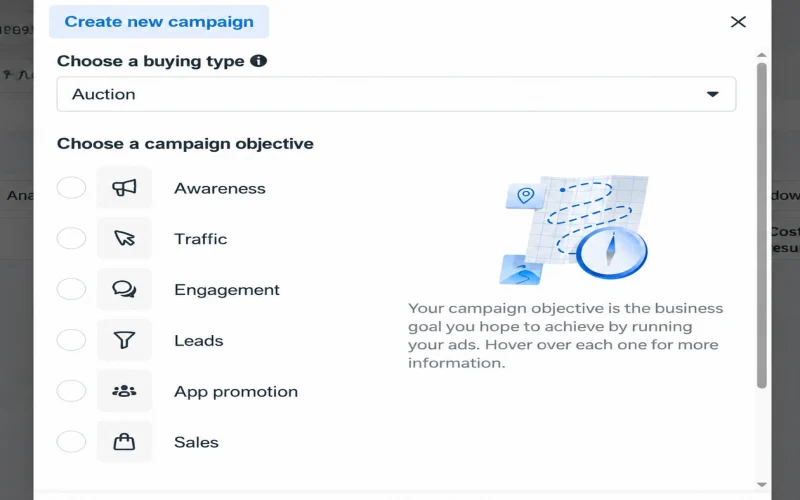
This is where you answer the question: What do I want from this campaign? In other words, what is the objective?
- Sales.
- Leads.
- Traffic.
- Engagement.
- Awareness.
- App Promotion.
Ad Set
This is where you set the audience, budget, placements, and conversion. One campaign can contain several ad sets, each with different settings:
- Who will see the ad?
- Where do they live?
- How old are they?
- Which placement will the ad appear in?
- How much will you spend?
- When does the campaign start?
- Where will the conversion happen?
- Which result do you want to optimize for?
Ad
This is where you build the ad itself:
- Image.
- Video.
- Carousel.
- Primary text.
- Headline.
- Description.
- CTA.
- Link.
How to Choose Your Facebook Ad Objective
Choosing the objective is one of the most important steps in running Facebook ads. There are several objectives available, so you need to pick the one that fits your campaign to get the results you want.
1. Awareness
The metrics here include reach, frequency, and video views, not just sales. Choose it when you want to:
- Increase awareness of your brand.
- Launch a new business.
- Promote a branch.
- Reach as many people as possible.
- Share an introductory video.
2. Traffic
If your real goal is sales, do not make Traffic your default choice. Choose it when your main goal is to:
- Increase website visits.
- Send people to a specific page.
- Increase visits to a digital destination.
3. Engagement
It can be used to get:
- Reactions.
- Video views.
- Comments.
- Shares.
- Messages, depending on the campaign setup.
4. Leads
Meta lets you manage leads and connect them to CRM systems when the right integration is available. This objective fits when you want to collect potential customers’ details, and a lead can come through:
- An Instant Form where the customer enters their details.
- A website the customer can browse.
- Messenger conversations.
- WhatsApp conversations.
- A phone call.
5. App Promotion
Suitable for apps that want to:
- Increase installs.
- Increase sign-ups.
- Increase in-app purchases.
6. Sales
Meta explains that the Sales objective is designed to help businesses reach the people most likely to take a purchase-related action. It is the closest option when your goal is for customers to:
- Buy the product.
- Complete an order.
- Book a product.
- Subscribe to a service.
- Convert on your website.
How to Create Facebook Ads Step by Step
Once your accounts and offer are ready, you can launch the campaign in a few steps:
Step 1: Open Meta Ads Manager
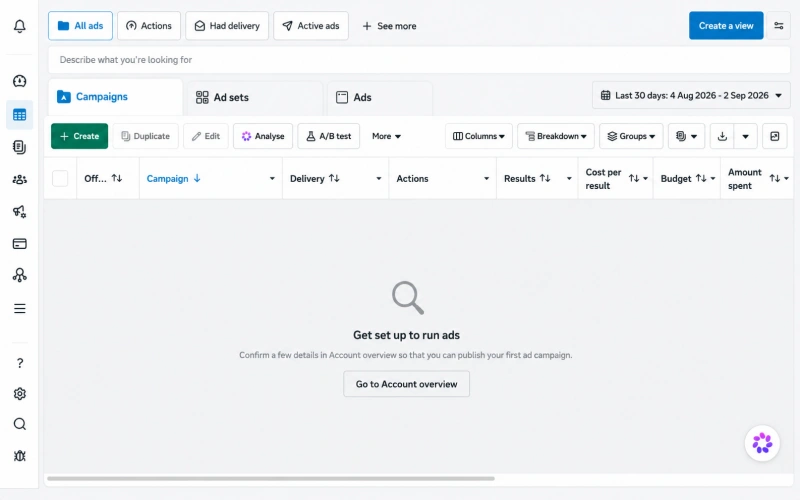
Go to the Ads Manager linked to your business account and select Create to start a new campaign.
Step 2: Choose the campaign objective
Choose the objective based on the business result you want, for example:
- Online store → Sales
- Service company → Leads
- New business building awareness → Awareness
- Website that wants visits → Traffic
Step 3: Name the campaign
Use a clear name such as Sales_KSA_September_2026 or Leads_Riyadh_Service_September.
The point is to recognize the campaign, audience, and date easily when you compare results later.
Step 4: Choose the conversion location
Decide where the result should happen and where the customer goes:
- Your website.
- An Instant Form.
- WhatsApp messages.
- Messenger messages.
- Your app.
- Directly to your sales team through Calls.
Step 5: Define the audience
Set the following:
- Country.
- City or region.
- Age.
- Gender, when there is a business reason.
- Interests, if relevant.
- Custom audiences, if available.
Step 6: Set the budget
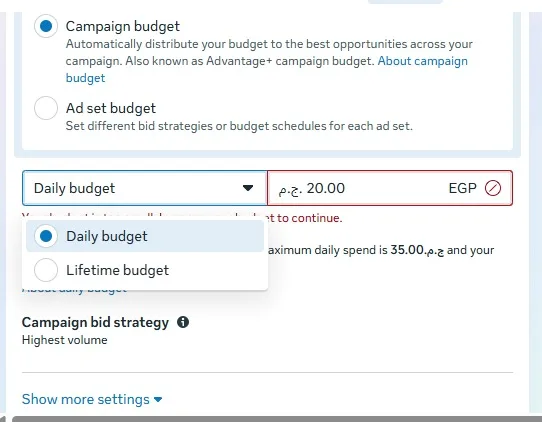
The choice depends on the campaign, how long it will run, and how much control you want over spending. Choose between:
- A daily budget.
- A lifetime budget, the total amount spent over the campaign.
Step 7: Choose ad placements
You can use automatic placements if your ad suits several placements at once, or manual placements when you have a clear reason, such as different designs or wanting to test a specific placement.
Step 8: Create the ad
At this step, you add:
- The image or video.
- The primary text.
- The headline.
- The link.
- The CTA.
- Then check the preview before publishing.
Step 9: Review and publish
Review these elements before launching the ad:
- Objective.
- Audience.
- Budget.
- Ad.
- Link.
- Payment method.
- Tracking.
- Then click Publish.
- The ad then goes through review according to Meta’s policies.
How to Define Your Target Audience
Defining your audience does not mean making it as small as possible. The goal is to give Meta enough room to find the right people for your product or service while keeping the audience relevant to your business. You can define your target audience in a few steps:
- Location: Target the whole country or specific areas around your branch.
- Age: Start from your business data if it is available. Do not assume 18 to 24 is the best audience just because they are active on Instagram, and do not assume older customers engage less. Define the age range based on your product or service.
- Gender: Use it only when there is a clear reason related to the product or your customers. It matters less than it used to.
How Does Meta Deliver Ad Results?
Once the campaign launches, the ad is not shown the same way to everyone. Meta’s system delivers the ad based on the signals it has and the likelihood of achieving the result you chose for the campaign.
That is why choosing Sales when you want sales is different from choosing Traffic when you want visits. For a related topic, see our article on the best times to post on social media.
- If you choose Traffic, you are asking the system to find people who are more likely to click or visit the destination.
- If you choose Sales, you are telling the system that the result you want is a purchase or a relevant business conversion.
Are Facebook Ads and Instagram Ads Different?
You do not need a separate ad system for each platform. In Meta Ads Manager, you can create one campaign that runs on Facebook and Instagram at the same time, then choose the right placements or let Meta distribute the ad automatically. One campaign can reach your audience in several ways, with the ad format adapting to where it appears. For example:
- Feed needs a design suited to the feed.
- Stories need vertical content.
- Reels rely heavily on fast vertical video.
- Some Messenger placements have different requirements.
Meta recommends designing content suited to Reels and vertical formats, and you can also take advantage of Meta Advantage+ placements.
Is the Boost Post Button Good for Beginners?
The Boost Post button can work for simple uses, such as extending the reach of a post or getting extra engagement. But if your goal is a measurable campaign that drives sales, leads, or conversions, it is better to work in Meta Ads Manager, because it gives you more control over:
- The campaign objective.
- The audience.
- The budget.
- Ad placements.
- Conversion events.
- Multiple ads.
- Testing.
- Retargeting.
- Performance reports.
What Is Meta Lattice?
Meta Lattice is one of the AI systems Meta now uses to improve how ads are selected and shown to users across its platforms. Simply put, the system does not rely only on the audience you define. It analyzes a large set of signals and data to understand who is most likely to engage with your ad or take the action your campaign is aiming for. It also helps unify and improve how ads are evaluated across multiple placements in the Meta ecosystem.
What this means in practice is that ad quality has become an essential part of reaching the right customer. Instead of relying too heavily on manual targeting, you can give the system more room to learn from campaign results and reach the people the data shows are most responsive. So focusing on creative, varied ad versions, a clear offer, and measurement now matters more than trying to define every audience detail by hand. Meta has said that Lattice improvements helped raise ad quality across some of its surfaces.
What Are Custom Audiences and Lookalike Audiences?
Custom Audience
A custom audience is one you build from sources such as:
- Website visitors.
- Past customers.
- Video viewers.
- People who engaged with your Instagram.
- People who engaged with your Facebook page.
- People who have already messaged you.
- People who added a product to their cart.
These audiences are very important for retargeting when you set up a new campaign or a similar campaign for the same product or service.
Lookalike Audience
The more closely your source is tied to the result you want, the more useful the signal you give the system. This helps you reach people who resemble your actual customers, such as buyers, qualified prospects, or high-value customers.
To go further, see our article on social media ad design costs and our guide to digital marketing and its main platforms.
What Is the Meta Pixel?
The Meta Pixel is a tool that sends event data from your website to Meta so you can measure what visitors do. It can record events such as:
- Page View.
- View Content.
- Add To Cart.
- Initiate Checkout.
- Purchase.
- Lead.
- Complete Registration.
- Contact.
Benefits of the Meta Pixel
- It shows whether an ad actually led to a result after the user moved from Facebook or Instagram to your website.
- It helps you build audiences and gives Meta signals about the people who convert.
- Meta explains that the Pixel is used to measure the actions people take on your website and connect them to your ads.
What Is the Conversions API?
The Conversions API sends conversion events from your server to Meta, and it can be used alongside the Pixel.
- Its purpose is to improve event measurement and strengthen the signals available to your campaign, especially given the challenges of browser tracking and privacy.
- Meta recommends using the Pixel and the Conversions API together when it fits your technical setup.
Common Tracking Mistakes
- Recording a Purchase twice.
- Recording a Purchase when someone views a product page.
- Not sending the conversion value.
- Not setting the currency.
- Not testing events.
- Connecting the data source to the wrong account.
How to Choose Ad Placements
Meta placements span Facebook, Instagram, and more. The most common are:
- Facebook Feed.
- Instagram Feed.
- Instagram Stories.
- Instagram Reels.
- Facebook Stories.
- Messenger.
- Audience Network.
Should You Use Automatic Placements?
For beginners, automatic placements can be a good starting point if your creative is designed for them. Keep an eye on results, though. If a video performs well on Reels but poorly elsewhere, you can later test placements separately based on the data.
How to Write a Successful Facebook Ad

A Facebook ad does not need lots of words. It needs a clear reason for the customer to stop and read or watch. Use this structure:
- Hook: a line that grabs attention.
- Problem: the problem or need your ad helps the customer with.
- Benefit: what the customer gets from your product or service.
- Proof: reviews, real numbers, a customer story, a testimonial, or documented results.
- Offer: state the offer clearly.
- CTA: ask for a specific action, such as calling, messaging, or visiting your website.
For a clear Facebook ad, focus on:
- What do you offer?
- Where?
- What is the benefit?
- What should the customer do?
What Are the Best Types of Ad Creative in 2026?
Do not rely on a single content type. Test multiple formats such as short videos and educational content. Knowing how to improve video visibility through YouTube SEO also helps you reach a bigger audience and increase engagement.
- Short video.
- UGC (honest reviews from customers).
- Product image.
- Carousel.
- Tutorial video.
- Customer testimonial.
- Product demonstration.
- Limited-time offer.
- Before-and-after ad, if allowed and compliant with Meta’s policies.
- Content showing how to use the product.
Tips for Video Ads
Meta highlights the importance of designing Reels and videos for vertical viewing and the mobile experience. Pay attention to the first few seconds of the video. Do not open with a long introduction about the product or service. Start with the problem, result, or idea the customer cares about, and use:
- A strong hook.
- Clear on-screen text.
- Captions.
- Suitable motion.
- A quick product reveal.
- A clear CTA.
What Is A/B Testing?
A/B testing simply compares two versions to see which one performs better. Test one clear variable at a time, such as:
- Video vs. image.
- A different hook.
- UGC vs. a professionally produced video.
- A discount offer vs. free shipping.
- A broad audience vs. an interest-based audience.
- A different landing page.
Do not change the audience, the ad, the budget, and the landing page at the same time. If you change everything together, you will not know what caused the result.
When Should You Start Optimizing a Campaign?
Do not treat an ad like a regular post, and do not stop a campaign after a few hours.
Mistakes to avoid when editing a campaign:
- Changing the budget several times a day.
- Changing the audience constantly.
- Stopping the ad too quickly.
- Creating dozens of ad sets with tiny budgets.
- Judging results by likes alone.
Start optimizing when you have enough data to make a fair comparison.
Key Meta Ads Performance Metrics
- Reach: the number of people who saw the ad.
- Impressions: the total number of times the ad was shown.
- Frequency: the average number of times each person saw the ad.
- CPM: the cost per 1,000 impressions.
- CTR: clicks as a percentage of impressions.
- CPC: the cost per click.
- Landing Page Views: the number of visits that loaded the landing page.
- Leads: the number of potential customers.
- CPL: the cost per lead.
- Purchases: the number of purchases.
- CPA: the cost per result.
- Conversion Rate: the percentage of visitors who complete the desired action.
- ROAS: revenue attributed to ads compared with ad spend.
After launch comes monitoring performance, analyzing data, and making improvements. This step is essential on any ad platform, whether you are running Facebook ads or learning how to manage Snapchat ad campaigns.
How to Run Your First Meta Ad, Step by Step
If you are starting from scratch, do not make “running an ad” your first goal. Start with these steps:
- Define the business result you want.
- Choose the right objective in Meta Ads Manager.
- Prepare the offer and the creative.
- Define the audience based on your business data.
- Choose a budget that fits your capacity and goal.
- Decide where the conversion will happen.
- Install the Pixel and the Conversions API when needed.
- Prepare a professional landing page or WhatsApp flow.
- Launch more than one creative.
- Let the campaign collect enough data.
- Monitor CTR, CPC, CPL, CPA, and ROAS based on your goal.
- Find the stage where customers drop off.
- Test one change at a time.
- Stop what is not delivering the result you need.
- Scale the budget gradually once the campaign proves itself.
Common Mistakes When Running Facebook Ads for the First Time
- Pressing Boost Post instead of building a truly measurable campaign.
- Choosing the Traffic objective and expecting direct sales.
- Targeting all of Saudi Arabia for a business that serves only one city.
- Creating many campaigns with small, scattered budgets.
- Not installing the Pixel at all.
- Ignoring the Conversions API completely.
- Not excluding past customers from new customer acquisition campaigns.
- Using one image for the entire life of the campaign.
- Judging the campaign on day one.
- Changing the budget or audience every day.
- Responding slowly to WhatsApp messages.
- Not calculating real profit after all costs.
- Not documenting campaign names and test results for later comparison.
Explore all of our social media advertising services.
Why Might You Get Lots of Messages but No Sales?
Because the number of messages is not the same as the number of qualified customers. The problem may lie in one of these factors:
- The ad.
- The offer.
- The audience.
- Response speed.
- How leads are qualified.
- The price.
- The sales team’s approach.
How to Use WhatsApp to Win Customers
If you sell through WhatsApp, the ad is not the end of the journey. Before launching the campaign:
- Set up WhatsApp Business.
- Add a welcome message.
- Prepare qualifying questions.
- Assign the person responsible for replies.
- Set a target response time.
- Record where each customer came from.
- Prepare answers to frequently asked questions.
Frequently Asked Questions About Facebook Ads
How much do I need to start running Facebook ads?
There is no single amount that suits every business. Start with a budget you can afford that collects enough data, then compare the cost per result with what is acceptable for your business.
What is the best objective for Facebook ads?
If you want sales, usually start with the Sales objective. If you want potential customers, use Leads. If you want visits, use Traffic. If you want awareness, use Awareness.
Why does my ad get clicks but no sales?
The problem may be the price, the offer, the landing page, trust, payment, shipping, audience quality, or tracking. Start by finding the point where customers drop off.
Why are my Facebook ad costs high?
Possible reasons include high competition, the wrong audience, weak creative, an unattractive offer, a busy season, the wrong objective, or poor conversion after the click. Do not assume the problem is Meta alone.
Sources
- Meta Pixel، Meta for Developers