





Building a website with Claude has become much easier than it used to be, especially if you want to create a landing page, portfolio, or simple business website without diving straight into the details of HTML, CSS, and JavaScript.
The idea is not that Claude will build a perfect website from a single sentence. Instead, you can provide it with your project concept, content, images, visual direction, and required functionality, then refine the website step by step until you have a version that is ready to preview, test, and publish.
Claude becomes much more useful when you treat it as a development and execution tool rather than something expected to guess what you want. The clearer your project brief and context are, the closer the final result will be to your expectations. In this guide, we will explain how to build a website with AI, with a particular focus on using Claude.
Can Claude Build a Complete Website?
Yes. Claude can help you build real websites, especially projects that are primarily front-end based. It can generate HTML, CSS, and JavaScript, create sections and pages, modify layouts, add interactive elements, improve mobile responsiveness, and generate files that you can continue developing later.
Claude’s official documentation demonstrates an example of turning information, files, and visual references into a portfolio page, then enhancing the experience with interactions such as hover effects and scroll animations, while expanding individual projects into standalone case study pages.
However, it is important to distinguish between a simple marketing website and a complex software platform. If your project involves payments, sensitive user data, authentication, or a large backend architecture, you should not rely on AI alone without having the implementation reviewed by an experienced developer.
Claude vs Claude Code: What Is the Difference?

If you are still planning your website or simply want to prototype a page quickly, you can start with Claude itself. You can design a website with AI by describing the project, writing the content, defining the page structure, and generating an initial prototype.
Claude Code becomes more useful once you are working with an actual project containing multiple files and want Claude to work directly inside the codebase. It can read your project files, modify different components, troubleshoot coding issues, and help you continuously improve the website.
Simply put:
Claude is better suited for planning, prompting, content creation, and early prototypes.
Claude Code is better suited for working directly inside a real codebase and modifying project files.
You do not need to start with the most advanced option. Begin with the tool that fits the current size of your project, then move to Claude Code once the website becomes more complex and you need Claude to write and modify production code directly.
Before Building the Website: Prepare the Information Claude Needs
The problem with generic prompts such as “Build me a professional website for a marketing company” is that Claude has to guess your audience, branding, messaging, visual direction, and even the primary purpose of the page.
Before you start, define the website’s goal, target audience, main pages, and the content you plan to publish. You should also prepare your logo, brand colors, images, and the main action you want visitors to take, such as requesting a consultation, contacting your team, or viewing your projects.
If you have websites you like, use them as visual references and clearly explain what you like about them: typography, whitespace, section layout, project presentation, or other specific design choices.
This is particularly important because the quality of the output depends heavily on the quality of the context you provide to the model. If you want to explore the design process in more detail, you can also read our guide on how to use Claude for design.
A Better Claude Website Starts with a Better Prompt
There is a major difference between saying:
“Design a modern website.”
And saying:
“Create a landing page for a digital marketing company targeting businesses in Saudi Arabia. The primary goal is to generate consultation requests. I want a clean editorial design, strong typography, generous whitespace, and a prominent CTA. Avoid excessive gradients, unnecessary cards, and the typical SaaS website look.”
In the second example, you are giving Claude a clear direction instead of allowing it to invent the entire concept.
A good prompt does not necessarily need to be extremely long. It simply needs to communicate five essential things: the goal, the audience, the website type, the visual direction, and the required functionality.
Create a Simple Design System Before Building Every Page
If your website contains multiple pages, it is better to establish consistent design rules from the beginning.
Define your color palette, primary fonts, button styles, spacing system, image treatment, card styles if needed, and responsive behavior on mobile devices.
This is essentially a Design System, and it does not have to be complicated. Even a simple set of design rules can help Claude maintain a consistent visual identity across the homepage, services pages, and project pages.
If you do not already have a clear visual identity, it may be useful to work on your brand visual identity before starting the website development process.
Example Prompt for Building a Website with Claude
You can start with a prompt like this:
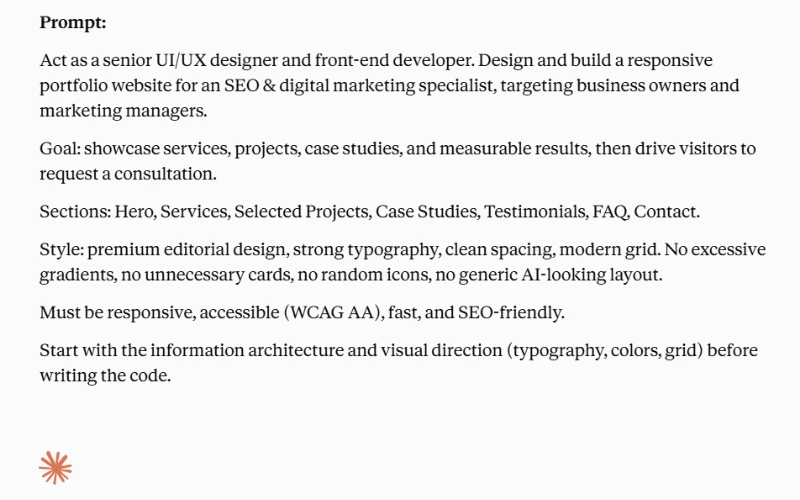
This type of prompt gives Claude enough direction to understand the project while still leaving room for refinement and iteration in later stages.
How to Build a Website with Claude Step by Step
Start by creating a project folder and adding the files, assets, and content Claude will need.
Next, ask Claude to define the overall website structure before generating the entire site. For example, a homepage might follow this structure:
Hero → Services → Projects → Testimonials → Contact
Once the structure is approved, ask Claude to generate the first version.
Review the design carefully, paying attention to typography, spacing, CTA visibility, and usability on mobile devices. Then replace placeholder content with real copy, images, and data before testing the website.
A practical workflow usually looks like this:
Structure → Design → Content → Review → Testing → Publishing
Following this process allows you to identify and fix problems early before they are repeated across multiple pages.
Do Not Ask Claude to Build the Entire Website in One Step
One of the most common mistakes is writing an enormous prompt that asks Claude to create every page, feature, and interaction at once.
You may get a usable first result, but maintaining and modifying it later will often be much more difficult.
A better approach is to start with the overall architecture, then build the homepage, followed by important sections, real content, interactions, and finally the polishing stage.
If the Hero section is weak, for example, do not simply say:
“Change the entire design.”
Instead, ask Claude to improve only the Hero section while keeping the rest of the page unchanged.
Specific, scoped instructions make the output much easier to review and control.
How to Make an AI-Generated Website Look Less Like an AI Template
Many AI-generated websites look similar because the prompts behind them are also similar.
Using words such as “Modern,” “Futuristic,” or “Professional” without additional context can easily result in a design packed with gradients, rounded cards, generic icons, and repetitive SaaS-style layouts.
Instead, use clear visual references.
For example, you could upload a screenshot and say:
“I like the heading scale and use of whitespace in this design, but I don’t want to copy its colors or section order.”
You could then use another reference to explain how you want project cards or case studies to be presented.
Pay particular attention to Typography and Visual Hierarchy. A professional website does not depend on excessive animation. It depends on clear messaging, strong hierarchy, good spacing, and thoughtful content presentation.
You should also explain what you do not want in the prompt, such as excessive gradients, unnecessary icons, or overused animation effects.
Edit Your Website Using Natural Language
One of the strongest advantages of Claude Code is that you do not have to manually search through CSS files every time you want to modify a specific part of the interface.
You can write direct instructions such as:
“Make the Hero section shorter on desktop.”
Or:
“Display the Projects section in three columns on desktop and one column on mobile.”
Or:
“Improve CTA visibility without changing the rest of the page design.”
You can also ask Claude to add Dark Mode, change fonts, adjust spacing, or implement a specific hover effect.
The key is to provide precise instructions and avoid asking for broad changes when you only want to modify one component.
Use real content before publishing.
Do not leave placeholders such as:
“Lorem Ipsum”
“Project One”
“John Doe”
inside the final website.
Add your real logo, service descriptions, project images, testimonials, contact details, and actual CTA.
Claude can help you rewrite and improve the copy, but you should never ask it to fabricate results, client testimonials, or achievements and present them as genuine.
You Can Expand the Website After Launch
You do not need to build every page before launching the first version of your website.
You could begin with a homepage and later add:
About, Services, Projects, Case Studies, Blog, and FAQ pages.
You can also introduce features such as Dark Mode, Forms, or Filters as the project evolves.
If you want to create reusable instructions and workflows for Claude, you can also read our guide on how to create and use Claude Skills.
Using GitHub with a Claude Website
GitHub is not just a platform for developers. In simple terms, it is a place where you can store your project and maintain a complete history of the changes made to it.
Instead of keeping dozens of versions such as:
final.html
final2.html
final-new.html
Git allows you to maintain a proper version history and return to an earlier version if something goes wrong.
Once you reach the publishing stage, the workflow becomes very practical:
Claude Code → GitHub → Hosting
Every time you modify the project, you can update the files, push the latest version to GitHub, and redeploy the website.
How to Publish a Claude Website Online

Once your local version is ready, you will need a hosting provider.
There are several options, including Netlify, Cloudflare Pages, and other hosting services that can connect directly to GitHub and automatically deploy your website.
Claude’s official documentation demonstrates an example using Netlify, while Chris Lema presents a workflow based on GitHub and Cloudflare Pages.
There is no single hosting option that works best for everyone. Your choice should depend on the type of website, the technology stack, deployment requirements, and the overall scale of the project.
If your website is part of a larger commercial project and requires custom UX, backend development, or advanced functionality, you may also want to consider professional web design and development services.
Connecting Your Website to a Custom Domain
After publishing your website, the hosting provider will usually give you a temporary URL.
For a professional business website, you will normally want to connect it to a custom domain associated with your brand.
The general process is:
Buy Domain → Add Domain to Hosting → Configure DNS → Enable HTTPS
The exact configuration steps vary between hosting companies and domain providers, so always follow the documentation provided by your hosting platform and domain registrar.
How to Edit a Website After Publishing It
If your website is connected to GitHub, updating it becomes much easier.
Ask Claude to modify the required section, review the result, commit the changes, and push the updated code to your repository.
Your hosting service can then redeploy the latest version automatically.
The workflow becomes:
Prompt → Edit → Review → Push → Deploy
This is where the value of organizing your project properly from the beginning becomes clear, instead of treating the entire website as a single standalone HTML file.
You can also use Claude to troubleshoot bugs and coding issues.
If something breaks, do not simply write:
“The website doesn’t work.”
Describe the problem in a structured way.
For example:
The mobile navigation button is not opening the menu.
Expected behavior: the menu should open after clicking the icon.
Current behavior: nothing happens.
Find the root cause and fix only the related code without refactoring unrelated sections.
Include the Error Message when available, or upload a Screenshot if the issue is visual.
Claude can be very useful for debugging, but problems involving payments, application security, authentication, or sensitive data should still be reviewed by an experienced developer.
Common Mistakes When Building Websites with Claude
Some of the most common mistakes that reduce the quality of an AI-generated website include using generic prompts, failing to provide enough real context, accepting the first generated version, and not defining consistent design rules.
Other common problems include ignoring mobile responsiveness, using oversized and unoptimized images, adding too many animations, or publishing the website before testing links and forms.
The problem is not using AI itself.
The problem is treating the first AI-generated result as if it were already the final production-ready version.
How to Make a Claude Website SEO-Friendly
Claude can help you implement many aspects of Technical SEO and On-Page SEO, but you should not rely on a generic instruction such as:
“Optimize the website for SEO.”
Review the implementation yourself and make sure the website uses Semantic HTML, a logical Heading Structure, unique Title Tags and Meta Descriptions for each page, clean URLs, and descriptive image ALT text.
You should also pay attention to Internal Linking, page speed, Responsive Design, and Core Web Vitals.
Your website should also have a Sitemap, a properly configured Robots.txt file, and Canonical Tags where necessary.
If organic search is an important source of traffic for the website, SEO should be integrated into the development process from the beginning instead of being added as an afterthought after launch.
You can learn more about Search Engine Optimization (SEO).
It is also useful to read our guide to AI and SEO in 2026 to better understand how AI-generated content can be used effectively without falling into keyword stuffing, thin content, or low-quality mass publishing.
Do Not Forget Website Indexing After Launch
- Publishing a website does not mean Google will immediately add every page to its search results.
- After launch, add the website to Google Search Console, submit your Sitemap, and make sure your important pages are crawlable and indexable.
- Monitor the indexing status of your pages and make sure your Robots.txt file is not accidentally blocking important URLs.
- For a more practical walkthrough, you can also review our website indexing guide for Google.
Quick Checklist Before Publishing Your Website
Before making the website live, make sure the design works properly on both mobile and desktop devices, and verify that every link, button, and form works as expected.
Review the content, images, and Metadata. Test page speed, confirm that HTTPS is enabled, and check the basic Accessibility and SEO requirements.
A small website does not necessarily need a checklist containing dozens of items, but you should never publish it before testing the same journey a real visitor will take.
Is Claude a Replacement for a Web Developer?
Not entirely.
Claude is extremely useful for Landing Pages, Portfolios, personal websites, simple company websites, Prototypes, and some MVPs.
However, projects involving complex backend systems, Authentication, Payments, sensitive information, or multiple third-party Integrations usually require deeper technical expertise.
When using Claude to design and build a website with AI, it is better to think of it as a tool that reduces development time and assists with coding, editing, and troubleshooting rather than a complete replacement for technical knowledge in every project.
Is Building a Website with Claude Suitable for Beginners?
Yes, especially if your goal is to build a simple website, Portfolio, or Landing Page.
You can describe your requirements in natural language, allow Claude to generate the files, and then refine the result using clear instructions instead of manually writing every line of code.
However, learning the basics of HTML, GitHub, and web hosting will make it much easier to understand, review, and manage the website properly.
How Long Does It Take to Build a Website with Claude?
It depends on the type of project.
Creating a simple Prototype or Landing Page can be relatively fast, while a multi-page website will require more time for content, design refinement, testing, and implementation.
You should not measure development time based on how quickly Claude generates the first HTML file.
Instead, consider how long it takes to reach a version that works well on mobile devices, follows SEO best practices, has been properly tested, contains no critical errors, and is genuinely ready to publish.
In other words, building a website with Claude is not about writing one massive prompt and waiting for a finished product.
A better workflow is:
Idea → Context → Design System → Prompt → Build → Review → Test → GitHub → Deploy → Improve
Start with a small project, give Claude clear context, improve the result in stages, and test everything before launch.
Following this workflow turns Claude into a powerful development assistant that helps you build and continuously improve your website instead of simply acting as a Website Generator that produces a generic template.
Frequently Asked Questions About Building a Website with Claude
Can You Build a Website with AI Like Claude Without Knowing How to Code?
Yes. You can build simple and moderately complex websites without deep programming knowledge because Claude can generate and modify project files using natural-language instructions.
However, learning some web development fundamentals will help you understand the project, review the generated code, and make better decisions.
Is Claude Code Suitable for Beginners?
Yes, especially when starting with a small project.
You can interact with Claude Code using natural-language instructions, although working with GitHub and managing project files may require some basic learning at first.
Can You Publish a Claude Website for Free?
Some hosting providers offer free plans or free usage tiers suitable for simple websites.
However, pricing, limits, and plan conditions can change over time, so you should always check the latest pricing before choosing a hosting platform.
Can You Connect a Claude Website to a Custom Domain?
Yes.
After publishing your website, you can usually connect a Custom Domain through your hosting provider’s settings and configure the required DNS records through your domain provider.
Can Claude Build an E-Commerce Website?
Claude can help create storefront interfaces, product pages, and some e-commerce functionality.
However, a real online store involves payments, orders, customer accounts, user data, and security requirements. For that reason, it is usually better to use a trusted e-commerce platform or have the implementation reviewed by an experienced developer.
Can Claude Fix Website Errors?
Yes. Claude can analyze code, review error messages, identify likely root causes, and suggest or implement fixes, especially when using Claude Code.
However, every change should be properly tested before being deployed to production.