







Today, successful websites and apps no longer rely only on good looks or long feature lists. User experience has become one of the most important factors in their success. The easier, clearer, and faster a website is to use, the more likely visitors are to stay and engage with the content or service.
That is why improving user experience has become an important step for any digital project that wants better results and a good impression on its audience. In this article, we cover the most important methods and strategies for improving user experience in practice, in ways that raise customer satisfaction and support your business or brand goals.
What Is User Experience (UX) Optimization?
User experience (UX) optimization is one of the core pillars behind the success of any website or digital service. Users care not only about the quality of the content or service, but also about how easy it is to use and how quickly they can find what they are looking for. The clearer and smoother the experience, the more likely visitors are to stay and engage positively. UX optimization aims to deliver a comfortable, effective journey that meets your audience’s needs and leaves an impression that builds trust and satisfaction.
It includes several important elements, most notably:
- Easy navigation: so visitors can reach important pages or information easily and without much effort.
- Speed: because slow page loading is one of the most common reasons users leave a website quickly.
- Mobile compatibility: since a large share of users browse on smartphones, the website must work well on all screens and devices.
Why User Experience Matters for SEO

User experience is no longer separate from SEO. It has become a core part of a website’s strength and its ability to perform well in search results. The faster, clearer, and easier a website is, the more comfortable the visitor’s experience, and the more positive signals search engines receive about the page’s quality and relevance. So caring about user experience does not only improve visitor satisfaction. It also helps improve rankings and reach a larger audience. The key ways user experience supports SEO:
- Lower bounce rate: when visitors find a website organized and easy to browse, they are more likely to stay instead of leaving quickly.
- Longer time on page: a comfortable experience and clear, well-formatted content encourage users to read and engage for longer.
- Better click-through rate: a good page with clear titles and attractive descriptions draws attention and encourages users to click.
- Better content quality and readability: by organizing paragraphs, choosing the right headings, and presenting content that is easy to follow and understand.
- Mobile support: browsing on phones has become a core part of internet use, which makes mobile experience optimization a real necessity.
- Better site structure and easier indexing: clearly organized pages and internal links help search engines understand and index your content better.
What Are the Best Tools for Measuring User Experience?
A range of modern tools and techniques supports UX optimization and helps improve digital performance continuously. Each tool is not just for tracking numbers, but for understanding visitor behavior more deeply, discovering strengths and weaknesses on the website, and delivering a faster, easier, more effective experience. By combining analysis, testing, and performance measurement, companies can make precise decisions that serve their marketing goals and improve the experience they offer customers.
The most important tools and techniques include:
- Data and visitor behavior analysis: using tools such as Google Analytics and Google Search Console to track visits, traffic sources, and bounce rate, and to see which pages get the most engagement, which supports more accurate decisions.
- On-page behavior analysis: tools such as Microsoft Clarity and FullStory help you understand how users interact with your website and spot frustration points or unexpected behavior through session recordings and interaction maps.
- Heatmaps and scroll tracking: tools such as Hotjar and Crazy Egg show where users click, how far they scroll, and which elements attract the most attention.
- A/B testing: testing several versions of a page or its elements to see which performs better in engagement or conversion, using tools such as Crazy Egg and Unbounce, especially on landing pages.
- Speed and technical performance measurement: tools such as Google PageSpeed Insights and Google Lighthouse measure loading speed, analyze Core Web Vitals, and assess overall performance, usability, and accessibility.
- Responsive design: flexible designs that work efficiently on all devices and give users a smooth experience whether they browse on a phone or a computer.
- Direct user testing: tools such as UserTesting let you watch real users interact with your website or service, revealing practical insights that are hard to get from numbers alone.
- Integrated dashboards: tools such as AgencyAnalytics bring UX, SEO, and digital performance metrics together in one place, giving a clearer picture for faster decisions.
- Search engine optimization (SEO) techniques: to improve the visibility of stores and websites in search results and reach potential customers effectively.
- Digital marketing tools: platforms such as Google Ads and Meta Ads help you reach your target audience more precisely, while connecting marketing performance to on-site user behavior for better results.
What Is the Difference Between User Experience and User Interface?

Many people think user experience and user interface are the same thing, but each plays a different and important role in building a successful website or app. The user interface is what visitors see directly, while user experience is what they feel while using the website or app from start to finish. When the two are balanced, the result is a stronger, clearer, more comfortable digital experience, which shows in user satisfaction, trust, and willingness to engage or buy.
What is user interface (UI)?
The user interface (UI) is the visible part that visitors interact with directly on a website or app. It includes the look of buttons, colors, fonts, icons, and how elements are arranged on the page. Its goal is a clear, attractive design that helps users interact easily and gives the brand a professional, consistent look. Key UI elements include:
- The colors used on the page
- The shape and size of buttons
- Fonts and how text is displayed
- Icons and visual elements
- A clear arrangement of sections and components
What is user experience (UX)?
User experience (UX) is the complete experience visitors have while using a website or app. It is not only about looks. It covers how easy navigation is, how quickly users reach their goal, how clear the steps are, how smooth the interaction feels, and the overall sense of comfort and trust. In short, user experience is about whether the website is actually easy, comfortable, and effective, not just good-looking. UX mainly covers:
- Easy access to information
- A clear user journey through the website
- Completing tasks or reaching goals quickly
- Reducing complexity and unnecessary steps
- Users feeling comfortable and satisfied while browsing
Core Web Vitals and Their Role in User Experience
Core Web Vitals are important metrics Google uses to assess the user experience a page provides. They do not focus only on the technical side. They measure how comfortable visitors are while browsing and interacting with the page. Think of them as a set of standards that show whether a website offers a fast, stable, easy experience, which directly affects user satisfaction and is part of how Google evaluates page experience. Core Web Vitals are built on three main metrics:
- Loading of the main content (LCP, Largest Contentful Paint): measures how quickly the most important element on the page appears. The faster the main content shows, the more comfortable visitors feel and the more likely they are to stay.
- Visual stability while loading (CLS, Cumulative Layout Shift): measures how stable page elements are while the page opens, so buttons, text, or images do not shift suddenly and confuse the user.
- Responsiveness to interaction (INP, Interaction to Next Paint): measures how quickly the page responds when a user clicks a button, link, or other interactive element. Faster responses make the page feel smoother and more professional, while slow responses leave a negative impression even if the content is good.
How Does Page Speed Affect Your Search Rankings?
Page loading speed has become a factor you cannot ignore when it comes to success in search results. Users today have little patience, and even a small delay can make them leave before they see the content. So speed is no longer just a technical improvement. It is an important part of user experience and a clear pillar of SEO.
The faster the website, the more comfortable and smooth browsing becomes, which keeps visitors longer, lowers the bounce rate, and increases engagement with the content. Website speed is also tied directly to Core Web Vitals, especially LCP, which measures how quickly the main content appears. So improving loading speed does not only give users a better experience. It also gives your website a stronger chance against competitors. Here are the best ways to improve website loading speed:
1. Optimize images: Images are among the elements that affect page speed the most, especially when they are large or poorly compressed. Use modern formats such as WebP and AVIF, which reduce image size while keeping quality. Lazy loading also helps by loading images only when they are needed instead of all at once when the page opens.
2. Optimize code files: The lighter and more organized your CSS and JavaScript files, the faster the page loads. Minify these files and defer non-essential scripts that can block the main content, which improves overall performance and gives users a faster, smoother experience.
3. Speed up the connection between the website and the visitor: Website speed depends not only on page content but also on how quickly data reaches the user. A CDN helps by serving content from the server closest to the visitor, which cuts loading time. Techniques such as preconnect and DNS prefetch also help the browser prepare the required connections earlier.
4. Enable caching: Caching reduces the time needed to reload a page when a user visits again, because some files are stored in the browser instead of being downloaded from scratch each time. This directly improves browsing speed, especially on frequently visited pages.
5. Choose strong hosting and use performance tools: However well a page is optimized, weak hosting can still slow the website down. Choosing fast, reliable hosting is a key step. Use tools such as Google PageSpeed Insights to test your website’s speed, find weak points, and keep improving based on real data.
Which User Experience Elements Affect SEO?
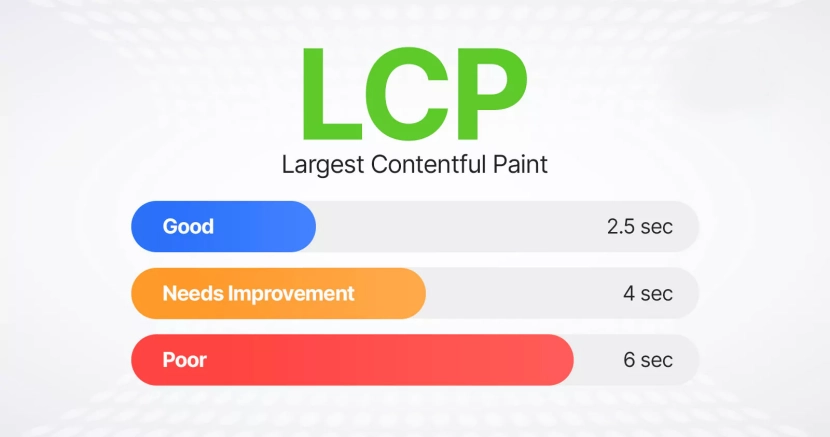
A successful user experience does not rely on attractive design alone. It rests on a set of elements that make the website faster, easier, and clearer for both visitors and search engines. The more comfortable the page is to browse, the clearer its content, and the faster it responds, the more likely users are to stay and engage with its pages. Google no longer looks at content alone. It also cares about the quality of the experience a page provides, which makes UX optimization an important part of any strong SEO strategy.
The most important user experience elements that affect performance and search visibility are:
1. Page loading speed and main content display
Website speed is one of the factors that shapes a visitor’s first impression. When the main content appears quickly, users feel comfortable and continue browsing without hesitation. This is where LCP (Largest Contentful Paint) comes in. It measures how quickly the main element on the page appears, and the better it is, the stronger the experience.
2. Stable page elements while loading
One of the most annoying things for users is starting to read or tapping a button, only for page elements to shift suddenly while loading. That is why CLS (Cumulative Layout Shift) is an important metric. It measures how stable the page layout is while it opens, and the more stable the page, the more comfortable and professional the experience.
3. Fast response to user interaction
It is not enough for a page to load quickly. It must also respond quickly when users click a button, open a menu, or interact with any element. INP (Interaction to Next Paint) measures how quickly the page responds to users, and it directly affects the quality of the experience.
4. Ease of use and intuitive navigation
The easier it is to reach sections and pages, the more comfortable users feel on the website. Intuitive navigation means visitors find what they want quickly without complicated steps or long explanations, which improves the experience and reduces quick exits.
5. Clear design and interface layout
A clear, organized design helps users focus and understand the page easily. Elements should be well arranged, buttons visible, and spacing comfortable, so visitors feel the website is easy and understandable from the first moment.
6. Organized, readable content
Organized content makes the page more attractive and easier to understand for both users and search engines. Use headings such as H1 and H2, short paragraphs, and clear lists, which improve readability and give the page a stronger structure for SEO.
7. Compatibility with mobile and other devices
Browsing on phones has become a core part of daily user behavior, so mobile compatibility is no longer an extra but an essential part of user experience. The better the website works on phones, tablets, and computers, the more likely it is to satisfy visitors and perform well in search.
8. Better site structure and internal links
A clear site structure makes it easy for users to move between pages and helps search engines understand and index content better. When pages are linked logically, the journey through the website becomes smoother and the site becomes clearer to Google. For a related topic, see our article on SEO meta data.
9. Smooth on-page interaction
A good experience is only complete when users can do what they want easily, whether clicking a button, filling in a form, or moving between sections. Clear buttons and easy access to the next steps are essential to good user experience.
What Are the Most Common Mistakes That Hurt User Experience?
Often the problem is not the service itself or the quality of the content, but small details on the website or app that make the experience less comfortable and more complicated. Even a good design can lose its impact if navigation is unclear, pages are slow, or there are too many required steps. As these problems add up, visitors become bored or confused and may leave without engaging or completing any step. So avoiding common UX mistakes is an important part of building a successful platform that keeps visitors. The most common mistakes that hurt user experience:
- Slow page loading: users expect fast access, and any delay may make them leave right away.
- Complicated navigation: when visitors struggle to find what they want, the experience becomes tiring and discouraging.
- Cluttered design: too many colors, blocks of text, or intrusive pop-ups distract users and make the page less clear.
- Not being mobile-friendly: a very damaging mistake, especially since many users browse on their phones.
- Unclear buttons or action steps: such as purchase or sign-up buttons that are not visible enough, which confuses users and delays their decision.
- Disorganized content: messy or overly long content makes the page less comfortable and less useful to read.
The earlier these mistakes are spotted and fixed, the smoother and more professional the user experience becomes, and the more likely visitors are to engage and stay longer.
Frequently Asked Questions About Improving User Experience
What does improving user experience mean?
It means developing a website or app so it is easier, faster, and clearer to use, so visitors can reach what they want easily and without friction.
Why is improving user experience important for companies?
Because good user experience increases customer satisfaction, raises engagement, improves conversions and sales, and gives the brand a better image with its audience.
What are the most important elements that affect user experience?
Easy navigation, fast page loading, clear design, organized content, and compatibility with mobile phones and other devices.
How does website speed affect user experience?
Website speed directly affects the visitor’s impression. Slow pages may make them leave quickly, while a fast website gives them a more comfortable experience and encourages them to keep browsing and engaging.
Is mobile compatibility really important?
Yes. A large share of users browse on smartphones, so a website that does not work well on mobile screens can weaken the experience and reduce how long visitors stay.
What are the main mistakes that hurt user experience?
A slow website, difficult navigation, cluttered design, unclear buttons, poorly organized content, and lack of mobile compatibility.
How does data analysis help improve user experience?
It helps you understand visitor behavior and needs more precisely, so companies can improve their services, content, and design based on realistic, well-informed decisions.
Does improving user experience increase sales?
Yes. A smooth, clear experience makes customers more comfortable while browsing or buying, which increases the chance of completing an order and raises conversion rates.
How do companies start improving user experience?
Companies usually start by understanding their audience better and analyzing their needs, then improving the design, content, and interaction so the journey through the website becomes easier and more comfortable.
How can a specialist team help improve user experience?
A specialist team helps by studying customer behavior, tailoring content, and using modern tools such as data analysis and responsive design, which improves customer satisfaction and the performance of your digital business.
If you would like a specialist team to handle this for you, explore our professional SEO services.
Sources
- Understanding Google Page Experience، Google Search Central
- Understanding Core Web Vitals and Google search results، Google Search Central